How do I get FoldMonkey to copy AND simultaneously move new files?
| |
You can copy and move files simultaneously by using the following basic instructions (note that these instructions can be customized to suit your specific needs):
1.
|
Right click on the FoldMonkey icon and select "Run as administrator". Use the settings window to set up the operation as you require (For example, if you want files renamed or folders created).
|
2.
|
Check the "Launch Program" check box.
|
3.
|
Check the "Wait For Program To Close Before Moving To Next File" check box.
|
4.
|
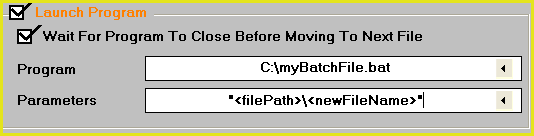
Enter the following information in the "Launch" section:
Program: C:\mybatchfile.bat
Parameters: "<filePath>\<newFileName>"
Note: Include the quote marks when entering the above information.
The Launch section should now look like this:
|
5.
|
Create a batch file C:\mybatchfile.bat with the following contents:
@echo off
cls
xcopy/y %1 "C:\Target Folder"
cls
exit
|
6.
|
Change the contents of the above file as required.
For example, if you wanted to copy files to C:\My Documents, then you must change this line to:
xcopy/y %1 "C:\My Documents"
For example, if you wanted to move files rather than copy them, you must change this line to:
move/y %1 "C:\Target Folder"
|
7.
|
Save and close the batch file.
|
You are now ready to start scanning. Each new file found will be copied to the folder that you have defined in the batch file.
|
|